


Skip to content

Panic Button — Instant Help at Your Fingertips

Empower your workforce with a built-in panic button that turns every employee’s smartphone into an essential travel security tool. Vismo’s panic button is a core component of our emergency response ecosystem — enabling staff to silently request help, trigger alerts, and connect to live monitoring, through their own devices.

Book an exploratory call

*
*
*

Our Partners

slack logoMicrosoft-Teams-SymbolInternational SOS LogoRapidSOS Logo

Why Your Organisation Needs a Staff Panic Button


Workplaces are unpredictable. Whether your teams are working lone shifts, late nights, in retail zones, or travelling in high-risk areas, unexpected threats may arise. A staff panic button gives employees confidence that help is just seconds away - reducing response times, enhancing safety, and helping you meet your duty of care obligations.

In retail settings, Vismo’s lone worker panic button supports employees facing aggressive shoplifters or conflicts.

For lone workers or remote staff, it delivers discreet assistance without needing voice calls - a true panic button for the field.

When integrated with geofencing, the system can detect when someone enters or leaves a high-risk zone - adding another safety layer for the best possible protection for employees.

How the Panic Button Works in Vismo


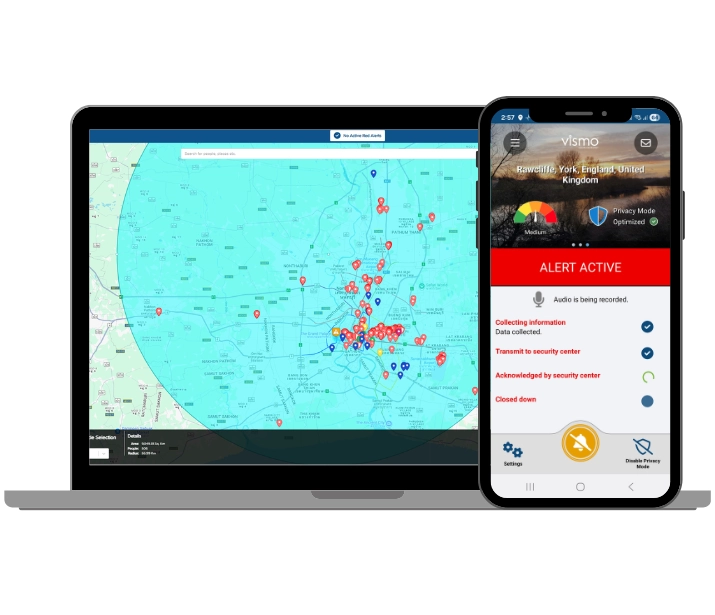
Press & Alert -In a moment of potential stress or danger, an employee taps the panic button app inside the Vismo Locate & Protect App. Options like haptics, a countdown delay, or sound can be customised to prevent false activations.

Immediate Notification - Once pressed, the employee panic button alert is routed to designated receivers - internal security, managers, or an Alarm Receiving Centre (ARC) for professional monitoring via Vismo’s 24/7 monitoring options.

Live Location & Context -The duress button system sends real-time location and contextual data to responders via the Vismo Secure Portal or the Vismo Monitor App. If the employee crosses a geofence threshold, that information is flagged automatically.

Covert Audio & Escalation - Where available, the system can record audio covertly at the moment of activation to add situational context for responders. Responders can then escalate — sending security, local emergency services, or follow your internal protocols.

Resolution & Aftermath - Once the incident is resolved, the alert is closed, and a record of the event remains in the portal — for audit, training, or investigation.


Key Features and Benefits


Discreet, one-tap activation -  Minimises the need to verbally speak or escalate risk

Geo-Fence integration - Know when staff travel into higher risk zones

Customisable alerts -  Use vibration, countdown or sound to suit your workflow

Real-time tracking & context - Enables fast, informed response

Covert audio recording -  Provides clarity in chaotic situations

Integrates with Checkpoints - Pinpoint floor-level location within buildings for faster response 

Secure back-end / Portal - Centralised incident logging, analytics and access control


panic button page image 3

Use Cases & Scenarios


Retail & Frontline Staff - Retailers face increasing incidents of theft, aggression, and harassment. Vismo’s employee panic button system gives staff a discreet, immediate way to call for help without escalating a situation verbally.

Lone Workers & Field Teams - For employees working alone or in remote environments, a lone worker panic button from your phone replaces the need for dedicated hardware - and connects to the same lone worker safety platform as the rest of Vismo’s monitoring tools.

Security & Risk Environments - Agencies, events, or organisations operating in unstable zones can boost protection by combining geofence alerts, an alert button, and real-time threat intelligence. For high-risk deployments, Vismo’s satellite devices ensure the panic button for employees remains functional even without mobile coverage.

Healthcare, Social Services & Outreach - Mobile health and social care teams visiting clients or working offsite benefit from a panic button app for employees to enhance situational safety and reassure staff - discreetly activatable without alerting an agitated client.

Compliance & Duty of Care - Having a reliable staff panic button system is often essential to meet regulatory or organisational safety obligations. View Vismo’s licence options to find the right level of coverage for your organisation.

Checkpoints webinar page

Implementation & Integration


Deploy via app: No need for extra hardware — the panic button is built into the Vismo Locate & Protect app.

Configure responders: Set up your escalation paths — internal team, external ARC, or mix.

Set geofence triggers: Define zones that automatically raise alerts or increase monitoring.

Integrate with Checkpoints: If you use QR-based Checkpoints, panic alerts can include precise in-building location.

Continuous monitoring & analytics: Use the secure portal to review incidents, track trends, and fine-tune your safety protocols.

Frequently Asked Questions 


Q: What is the difference between a “staff panic button” and a “panic button app for employees”?
A: A staff panic button typically refers to the functional capability - hardware or software - to trigger an emergency alert. A panic button app for employees is the mobile application version of that function, enabling activation from a smartphone without needing dedicated devices. Vismo’s solution is app-based, but for environments where a physical device is required, Vismo’s satellite devices include dedicated SOS functionality.


Q: Does the panic button always reveal the user’s location?
A: Yes. When the employee panic button is activated, the system sends the user’s real-time location to responders. However, Vismo also includes privacy modes for tracking that allow normal movement to remain private until an alert is triggered.


Q: Can I limit false activations?
A: Yes. You can configure delay countdowns and require long-press activation to reduce accidental alerts and can be adjusted per user group or licence tier.

Q: What happens if the employee is in a building, indoors, or a basement?
A: Vismo combines GPS, Wi-Fi, cell tower triangulation, and other signals to estimate location. When used together with Checkpoints, the system can infer more precise floor-level location via scanned QR codes - ensuring responders know where within a building a lone worker panic button alert originated.


Q: Can the panic button work offline or without cellular coverage?
A: The panic button’s effectiveness depends on connectivity, but when used alongside Vismo’s satellite devices or alternative communication channels, Vismo supports emergency messaging even in remote or low-signal areas. This makes the duress button system viable for field teams operating off-grid.


Q: Who receives the alert when the panic button is pressed?
A: Alerts go to designated contacts, internal security teams, or an Alarm Receiving Centre (ARC), depending on your configuration.