

Skip to content

Geofencing & Geospatial Alerts

Geofencing is a powerful tool in modern risk and employee safety platforms — and at Vismo it is a core pillar of our Locate & Protect architecture. With virtual boundaries, real-time alerts, and context-aware monitoring, geofencing enables organizations to detect when employees enter, leave, or wander outside defined zones. Combine that with Vismo’s alerting, analytics, and response capabilities, and you get a robust safety scaffold around mobile or remote teams.

In this page we’ll cover: what is geofencing, how Vismo’s geofence tracker works, use cases, best practices, and an FAQ to answer your questions.

NY - Geofences

What Is Geofencing?


Geofencing refers to the creation of virtual perimeters (boundaries) around real-world geographic areas. Think of drawing a shape on a map and treating that virtual border as a trigger point. When a tracked device (e.g. an employee’s phone running Vismo Locate & Protect) crosses into or out of that boundary, it triggers an alert or action to the appropriate people within a business.

In practical terms:

  • A “geofence alert” fires when someone enters or exits a zone.

  • A “geofence app” keeps track of location data relative to those zones.

  • Uses include compliance, safety, location-based messaging, and proactive intervention.

As an example, Vismo allows administrators to define geofences around customer sites, field work zones, hazardous areas, or safe hubs. When employees cross those geofences, your systems can log it, send alerts, or escalate for review.

How Vismo’s Geofence Capabilities Work


Setting Up Geofences in Vismo

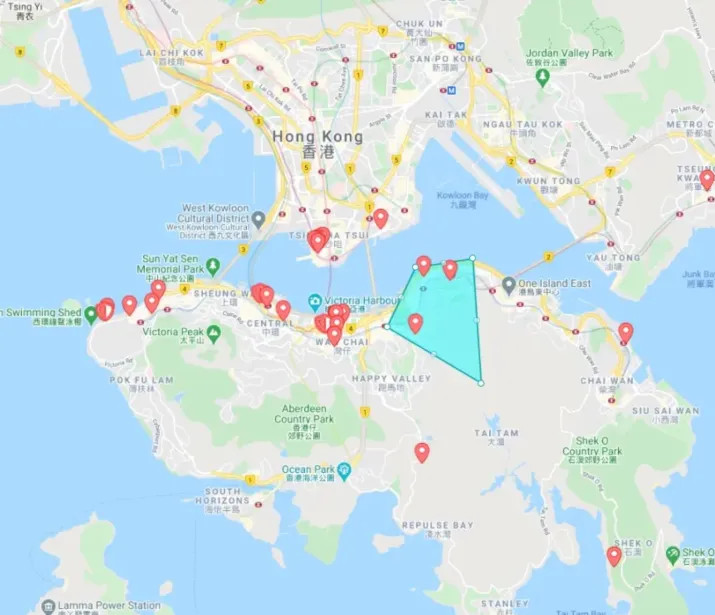
Within the Vismo Secure Portal, administrators can draw geofences of any shape and assign metadata (e.g. name, zone type, activation times). These virtual zones can carry rules or actions such as outbound alerts, inbound warnings, or silent monitoring.

Geofencing is tied to active tracking licenses in Vismo, enabling automated evening.

Real-Time Monitoring & Alerts

Once a fence is active, the Vismo platform monitors the location stream from devices. When boundary crossing is detected, it immediately raises a geofence alert. That alert can then route to your designated personnel, internal teams, or to an external monitoring service.

For example:

  • A field engineer departs a work site before scheduled end time → auto alert to supervisor.

  • A lone worker exits a safe perimeter unexpectedly → trigger immediate review or response.

  • During a crisis, your mass notification engine can combine geofence logic to send messages only to those within certain zones.

Geofencing doesn’t just produce alerts — it also produces logs and trails. You can view entry/exit times, movement paths, and cross-reference with other data (incidents, alerts, user behaviour). This helps strengthen audits, compliance, root cause analysis, and training.

Vismo Secure Portal Hong Kong

Integration & Escalation

Geofence events can integrate with other Vismo modules:

  • Mass Notification: to push alerts or instructions to people within or outside zones

  • Emergency response: tie fence events into crisis logic or response workflows

  • Checkpoints / proof-of-presence: combine geofence with scanned indoor checkpoints to produce finer location control

FAQ


Q: What is the meaning of geofence / geofencing?
Geofencing is the practice of defining virtual geographic boundaries around an area and triggering alerts or actions when a tracked object enters or leaves that boundary.

Q: How does a geofence tracker function?
A geofence tracker is the system component (software & mapping engine) that continuously monitors device location, compares it to established fences, and raises events when boundary crossings occur.

Q: Can I use geofencing for employee monitoring?
Yes — geofencing can be part of employee monitoring when users are informed and consent, especially for safety use (e.g. knowing when someone leaves a work zone unexpectedly). It’s best applied with clear policy, transparency, and purpose.


Q: What’s a “geofence alert”?
A geofence alert is a notification triggered when a device crosses into or out of a defined virtual boundary — for example, entering a worksite zone or leaving a safe perimeter.

Q: Does Vismo support geofence alerts even when the user is offline?
Geofence functionality relies on location data; if the device is offline or GPS is unavailable, the accuracy may degrade. Some transitions may be caught once connectivity is restored, but real-time alerts depend on connectivity.

Q: How accurate are fences — indoors vs outdoors?
Outside, GPS gives good accuracy for fences of moderate size. Indoor environments or dense urban canyons may degrade accuracy. Combining fences with indoor Checkpoints or WiFi/cell signal layering helps improve performance.


Q: Who receives the alerts from a geofence event?
It depends on configuration. Alerts can go to internal managers, security staff, or external monitoring (ARC). Administrators set escalation paths and roles in the Vismo Portal.

Q: Can I disable geofencing for privacy reasons?
Yes — Vismo supports privacy modes where continuous location tracking is suspended, but geofence logic can be reactivated when needed (e.g. during a shift or after an alert).