

Skip to content

Ask, Locate and Act in One Conversation

Vismo AI enables organizations to ask questions about their people in plain language and act on the answers straight away. Built into the Vismo Secure Portal, it answers from your live locations, devices, alerts and threat intelligence feeds.

When an incident breaks, ask who is inside the affected area, what is happening in the region or where a user is, then center the live map view, build a table or message the people affected.

Book an exploratory call

*
*
*

This site is protected by reCAPTCHA and the Google Privacy Policy and Terms of Service apply.

Our Partners

slack logoMicrosoft-Teams-SymbolInternational SOS LogoRapidSOS Logo

What is Vismo AI?

Vismo AI is an AI assistant inside the Vismo platform for security teams, GSOCs and travel risk managers. It reads the data already in your account and does the searching, filtering and messaging for you.

A conversation, not a query. Ask in plain language from a panel beside the live map view, or full screen. No filters to set and no reports to build.

Grounded in your own data. Answers come from your users, devices, alerts and risk intelligence feeds, not the open web.

It works the portal for you. Center the live map view on a user, highlight a group or message the people affected, all from the same conversation.
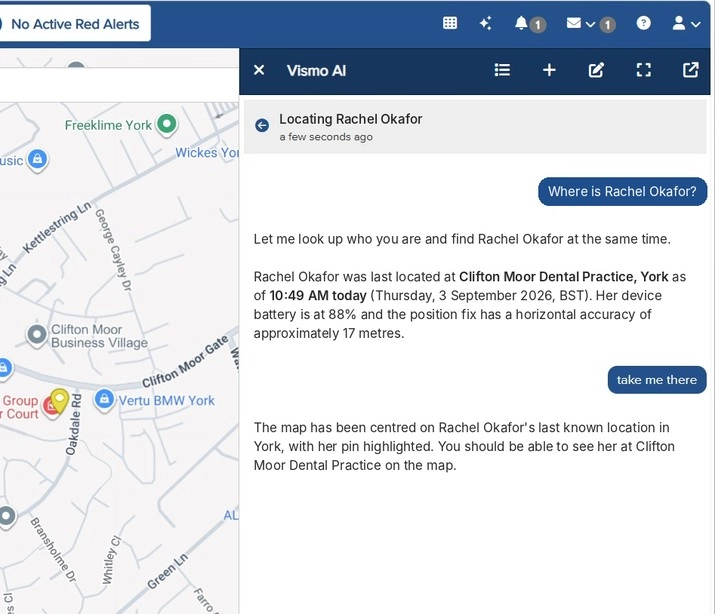
Vismo AI panel answering where a user is, with her last known location, battery and fix accuracy beside the live map

Analyze Your Account Data in One Question

Ask a question and Vismo AI reads across your live locations, devices, alerts, check-ins and risk intelligence feeds at once, then answers with the source, severity and timestamp. Work that used to mean filtering screens and building reports takes a single question.

Ask “Where is Rachel?” and it returns her last known location, the time of the fix, its accuracy and her device battery from the Vismo Locate & Protect App. Say “take me there” and the live map view centers on her.

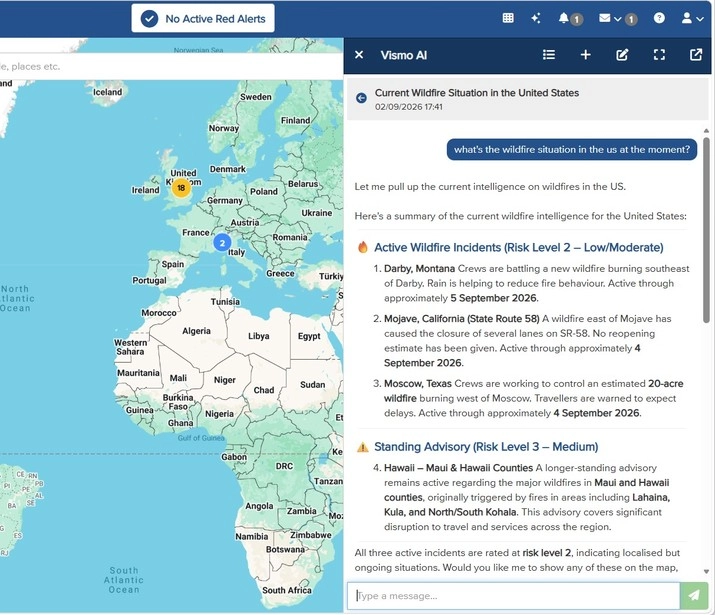
Vismo AI briefing on current US wildfires, grouped by risk level with locations and active dates

Situational Briefings by Risk Level

Ask what is happening in a country or region and get the active incidents grouped by risk level, drawn from the threat intelligence providers already in your account.

Each item shows its location, how long it is expected to last and what it means for travel security.

Mass Notification Map

Reach People in an Incident

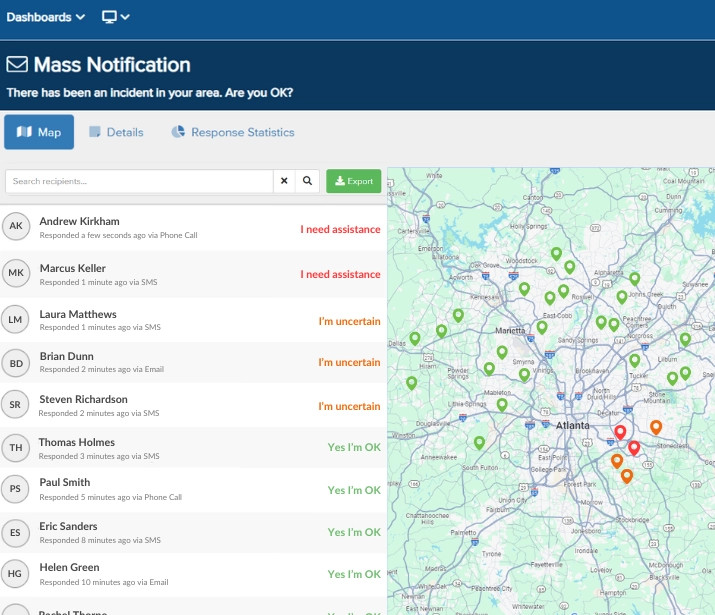
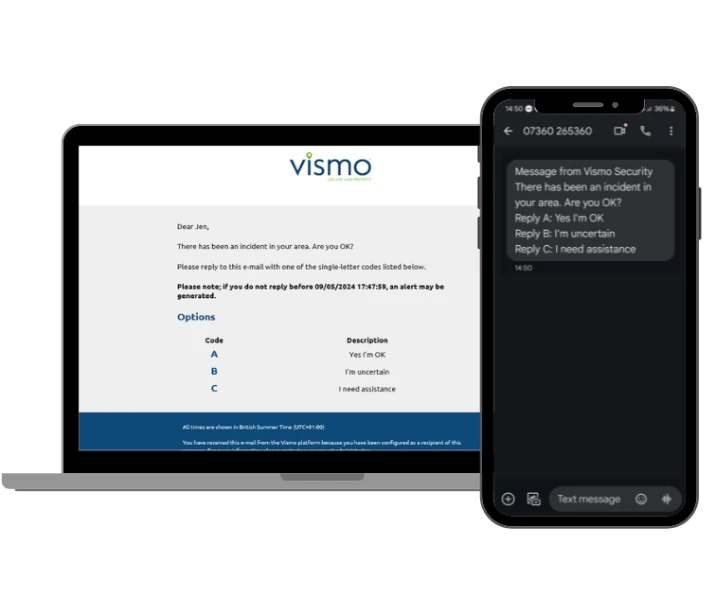
Ask “Who on our team is within 2 km of the protest?” and Vismo AI lists the users inside the area, using the same boundaries as geofencing. Ask it to message them and it sends through Vismo Notify by app notification and SMS, then tracks who has acknowledged.

Mass Notification Messaging

Built for the Step After Detection

Most AI in physical security is built to detect. Vismo AI is built for the next step: it triages what is happening, works out who is affected and brings the decision to a person on your team. With your say-so it sends the advisory, escalates non-responders and logs it all to the incident as part of your critical event management process.

Your team can then follow its response procedure step by step with Vismo Workflows.

Benefits of Vismo AI

Answers in one step

No filtering or report building. The question is the interface.

Faster first response

Find and reach affected users without switching tools.

Useful on day one

No new console to learn and no training needed.

A full record

Every question, answer and message saved to the conversation.

Stronger duty of care

See who is affected the moment an incident breaks and support your travel security obligations.

Answers with sources

Named provider, severity and timestamp on every answer, so your team can trust what it reads.

Works Across the Vismo Platform

Vismo Secure Portal

Where Vismo AI lives, beside the live map view.

Crisis & Incident Management

Run your response procedure step by step with Vismo Workflows.

Mass Notification

App and SMS messages sent through Vismo Notify.

Threat Intelligence

The risk feeds behind situational briefings.

Geofencing

The boundaries that show who is inside an area.

Panic Button & check-ins

Alerts and check-ins your team can ask about in plain language.

What is Vismo AI?

Vismo AI is an AI assistant built into the Vismo platform. Security teams, GSOCs and travel risk managers use it to ask questions in plain language about their users, devices, alerts and risk intelligence, and to act on the answers from the same conversation.

What can Vismo AI do?

It can find a user’s last known location, brief you on active incidents in a country or region, reformat answers as tables or filtered lists, identify who is inside an affected area, and send messages to them by app notification and SMS.

What data does Vismo AI use?

Only the data already in your Vismo account: user locations, device status, panic alerts, check-ins and the risk intelligence feeds you subscribe to. It does not answer from the open web.

Is my data used to train the AI model?

No. Your location and personnel data is never used to train the underlying model.

Who can see what in Vismo AI?

Vismo AI follows your existing permissions. It only returns data the signed-in user is already allowed to see.

Is Vismo AI secure?

Yes. It sits inside Vismo’s ISO 27001 scope, the same certified information security management system as the rest of the platform. Conversations are retained per account and every message sent is logged.

Is agentic AI safe to use in physical security?

Vismo AI only acts through the Vismo platform. It can move the live map view, send a message through Vismo Notify and escalate to anyone who has not responded. Messages go out with your say-so, and every action is logged to the conversation.

Which Vismo products does it work with?

It works inside the Vismo Secure Portal and draws on the Locate & Protect App, Mass Notification, Threat Intelligence and Geofencing.

Is Vismo AI included in my license?

Speak to our team about adding Vismo AI to your account, or see Vismo License Options.

Do my team need training to use it?

No. If your team can type a question, they can use Vismo AI. There is no new console to learn.

How do I see Vismo AI in action?

Book an exploratory call. We run two of your team’s own questions live on your account in a 20-minute session.